Sign-up errors
Binance Says Your Email or Phone Number Is Already Registered
Check the entered details and old records, then follow the steps for your own account, an unfamiliar account or a newly assigned number.
If sign-up says your email or phone is already in use, compare the entered details with your own contact information first. If they match, look for your previous registration: sign in to an account you recognise, or ask Binance to investigate an unfamiliar link. The checks below also cover a sign-up interrupted by a lost connection.
Go directly to signing in to your existing account or an unfamiliar account or newly assigned number. The linked instructions for password resets, forgotten-account appeals and email-change restrictions were checked on 20 September 2026.
Check which error you received
Read the whole message and make sure it's about your email address or phone number:
- If it says your ID or identity is already used or verified, that's an identity verification issue, not a contact method one. See ID already used by another account.
- If it says the code is wrong, see verification code invalid or expired.
- If there's no message and a button just won't respond, see sign-up page errors.
If it really is your email or phone that's in use, read on.
Check the email, number and calling code
Compare the field with your own email address or phone number, character by character. Look for extra letters, spaces or misplaced digits. Follow the phone format shown on that page: check a separate calling-code selector if one is present; if the field says “without country code,” leave the code out. You do not need to find a selector when none is shown. A typo may identify someone else's contact details, so correct it and check whether the message clears.
- Typo: fix it, click [Register] again and continue with the sign-up steps.
- No typo: check your old messages and sign-in method for an account you recognise.
Find your registration records and sign-in method
Search the inbox, archive, spam and deleted-mail folders in your current and previous email accounts. Open useful messages and compare their recipient, purpose and date with what you remember doing. A code email records a verification request; an account-created or welcome message is more useful when checking whether registration finished. If several addresses forward into one inbox, use each message's recipient details to distinguish them. Search only mailboxes and devices you are entitled to use.
If you remember choosing Continue with Google, Apple or Telegram, identify the provider account you selected. If you typed a Gmail address into the email field instead, follow the email-registration route. When the method is unclear, compare the provider sign-up steps with what you remember: choosing a provider account, confirming access, or setting a Binance password.
If a provider login is involved, which account should you choose?
On a shared device, read the account shown in the Google or Apple chooser before continuing. If it is another person's account, cancel rather than approving it. If it is another account of your own, choose the one used for the original registration. Signing into the wrong provider account can leave you looking at a different registration screen, so keep a note of the choice you made.
If you used Apple's Hide My Email, check the address recorded for Binance in your Apple account instead of guessing from a masked address. The provider guide linked above shows where to find it. A forwarded message can reach your usual inbox even when the address recorded for that service differs. Do not remove the existing Apple connection merely to make the addresses match; identify the original sign-in first. Enter a provider's password only in that provider's sign-in flow, not as a guessed Binance password.
When the records point to an account you recognise, open the official website or app to sign in. Avoid relying on an old email button to reach it. If you still cannot recognise the account, use the unknown-account checks before trying a password reset. Having access to an inbox today does not establish who created every account associated with it.
Sign in to an account you recognise
Note the registration method and contact details you found, then open the official website or app to sign in. If you recognise your account but have forgotten its password or lost a security device, use the relevant option below. If you cannot remember the contact details at all, the Forgot Account appeal is covered later in this section.
You have identified your own account: sign in
Choose [Log In] on the website, or open Sign Up / Log In in the app. Use the option that matches how you originally registered. If you cannot find it, see the login screenshot and entry labels below.
- You registered through Google, Apple or Telegram: use the matching provider option offered on the login page and select the original provider account. If the screen asks to create a new account, or the selected account is wrong, go back and check the original method before continuing. Enter the provider password only in that provider’s sign-in step.
- You know the password: sign in. Then check the account's identity verification status and finish it if needed.
- You've forgotten it: click [Forgot password?] and follow the security checks to set a new one. Binance notes that withdrawals, P2P selling, payment services and internal transfers are disabled for 24 hours afterwards; see How to Reset Your Binance Account Password.
- The old phone number or authenticator used for security checks is gone: that's account recovery and needs Binance's official security reset process, via the options on the login page or support. This site doesn't cover recovery in detail.
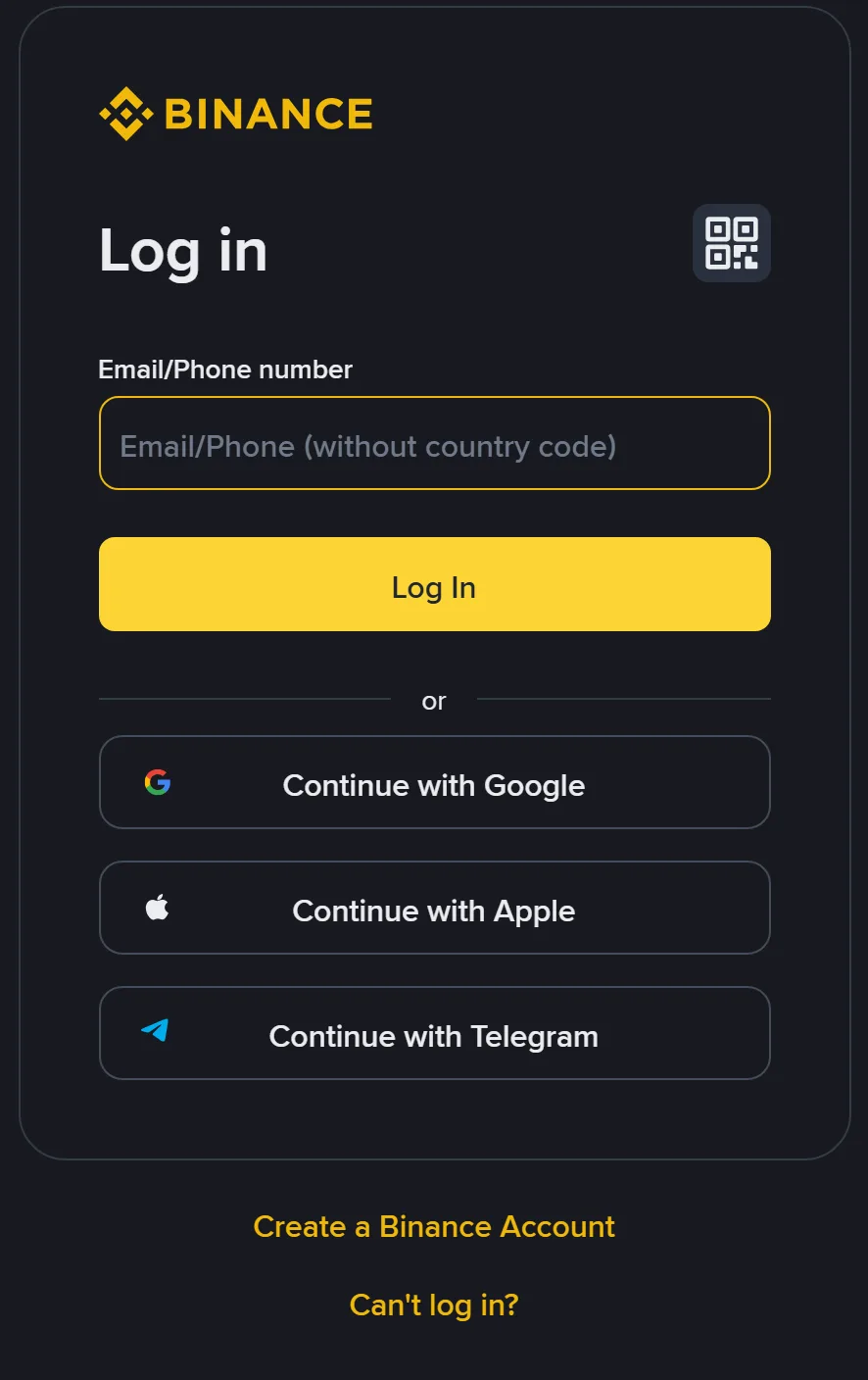 View the original login image (new tab)
Find the method you originally used
Email / Phone numberUse the contact details linked to your existing account. This capture says “without country code”; follow your current page if its instructions differ.
Google / Apple / TelegramChoose the original provider, then select the same provider account you used before.
Can't log in?In this capture, it is below “Create a Binance Account.” Check the help options there if you cannot continue.
Original Binance website capture, English interface, desktop browser, September 2026. This shows the entry page only; a passkey or another check may appear next. Follow the current prompts.
Resolved when: you're signed in to your existing account. You don't need a new one.
You have an account but can't remember which email or phone you used
Binance has a "Forgot Account" appeal for this, with separate appeal pages for unverified and verified accounts; the links can also appear after an unsuccessful login. Verified accounts are asked for ID photos and a statement video, among other things. Binance says review typically takes 1 working day, excluding weekends, after all appeal steps are completed successfully. This is not counted from the registration error and is not a guaranteed completion deadline. See How to Appeal for 'Forgot Account' on Binance.
You changed the email on an old account
If you replaced the email on an existing account and now want to register a new one with the old address, Binance says an old email can't be used to re-register for 30 days after the change (see How to Change My Binance Account Email). This 30-day restriction concerns the previous email after an email change; it is not a waiting period for every “already in use” message, nor a guarantee that a new registration will work afterward. If your old account remains open, first sign in using its current linked method.
You switched to Log In, but still cannot continue
This section is for an existing account you have identified as your own. Read the screen you are on now rather than returning to registration and entering the same details again.
A passkey prompt appears before a password field
An account with a passkey may request that check first. See whether your device offers the passkey for this account and follow the prompt. If it is unavailable, Binance’s password-reset instructions provide “My Passkeys Are Not Available” and alternative verification options. Continue with the check offered for the same account, keeping the account name or contact details in view.
The screen asks for an old phone number or authenticator
If the login page requests a code from an old phone number or authenticator, that security check still needs attention, including after a password reset. Look for the security-reset or help option on that page if the old device is unavailable. Complete verification yourself through the official page. Keep the codes private and use Binance’s recovery process rather than a stranger offering to receive them.
Sign-up says “in use,” but login cannot find the account
Compare the full email address or number, country calling code, sign-in method and website used for both attempts. Make sure you did not switch between different inboxes or entry points. Keep both messages and the times they appeared. If the results still conflict, give both to official support rather than cycling through passwords or starting new registrations.
If a connection failed during your earlier sign-up, a later “in use” message does not establish that the interrupted attempt successfully created your account. Use the interrupted-registration checks to confirm the result. Continue with the login steps here only once you have identified the account as yours.
You never registered, or do not recognise the account
Start with your own account records and contact details. If you recently obtained the phone number, check the reassigned-number situation below. If you have always used the email address, review old messages and your provider’s security activity. Give official support the registration error and what you found so they can investigate the linked account.
You recently received the phone number
Carriers can reassign disconnected numbers to new users. Receiving texts at a number now does not make an earlier Binance account associated with it yours. Do not reset an unfamiliar account's password or use a code to enter it and inspect its details.
Note when you began using the number, its country calling code and the exact registration error. Tell Binance support that this is your current number but you do not recognise the linked account. If official support requests evidence of your use of the number, follow its requirements. Do not contact a previous holder for passwords or security codes. Binance must determine what can be changed and whether the number can be used for registration.
The email has always been yours, but you remember no account
Search the records described above, then check your email provider's recent security activity, signed-in devices and forwarding settings. If you find activity or rules you do not recognise, follow the provider's security process to change the password, remove unfamiliar access and review recovery methods. Gmail users can follow Google's account-security instructions.
If nothing looks unusual, keep the registration error and ask Binance about the linked contact method. The error is not evidence that someone accessed your inbox. Check any email-security alerts separately with your email provider.
Should you just register with another email?
First establish whether the existing account is yours. Changing the email you type into a new form does not resolve ownership of the old account or remove its completed identity verification. If ownership is unclear, wait for official guidance about your situation before deciding whether another contact method is appropriate.
Ask Binance which evidence is needed and where you should check the response to this request. Support may be unable to disclose another account holder’s personal details. This site cannot check the association. Whether a contact can be unlinked or used for registration depends on Binance’s findings and the instructions it gives for your case.
What to tell support
Open chat from the Support Center on the official website. If you are not signed in, follow the visitor-support entry instructions. The two things that matter most are whether you control the email or phone number and whether you remember registering. For example:
When signing up for Binance, I was told my [email address / phone number] is already in use.
This contact method is mine and I [can / can't] receive its emails or texts.
I [remember / don't remember] registering with it before. [I tried Forgot password and the result was … / I haven't tried to sign in.]
I was using the [website / app] at [date, time and time zone], and the message said [exact text].
I'd like to know how to deal with the account linked to this contact method.
To start, share only the email domain (such as @gmail.com) or the phone's country calling code. If support genuinely needs the full details inside an official channel, provide them as instructed. Do not send passwords or codes in chat. Complete any required security check only on the official verification page for the request you initiated.