Verification codes
Got a Crypto Exchange Sign-Up Code You Didn't Request?
Work out where the code came from and whether you have an account there, then check the message with Binance Verify or your Anti-Phishing Code. If someone asks for the code, don't give it.
A text or email arrives with a sign-up code from a crypto exchange, and you haven't tried to open an account anywhere. The most likely explanation is simple: someone typed your phone number or email address into that exchange's sign-up or login page and tapped the button to send a code. The other possibility is that the exchange never sent it at all, and the message is only using its name.
Either way, the first move is the same. Keep the digits to yourself, leave any link in the message alone, and don't call back a number it gives you. While the code stays with you, whoever requested it is stuck at that step. The US Federal Trade Commission's alert on verification codes compares a password plus a code to a door with both a lock and a deadbolt: holding only one key doesn't get anyone inside. The sections below use Binance as the example exchange.
Where an unrequested code can come from
- A typo on someone else's side. One wrong digit or letter and the code lands with you instead. If it's a single message and nobody follows up, this is a reasonable first assumption.
- Someone is trying your number or address. They may want to open an account with it, or they already have a password for an existing account and the code is the last thing in their way. This version often has a second act: a call or direct message from a "support agent" who says the code went out by mistake and asks you to read it back.
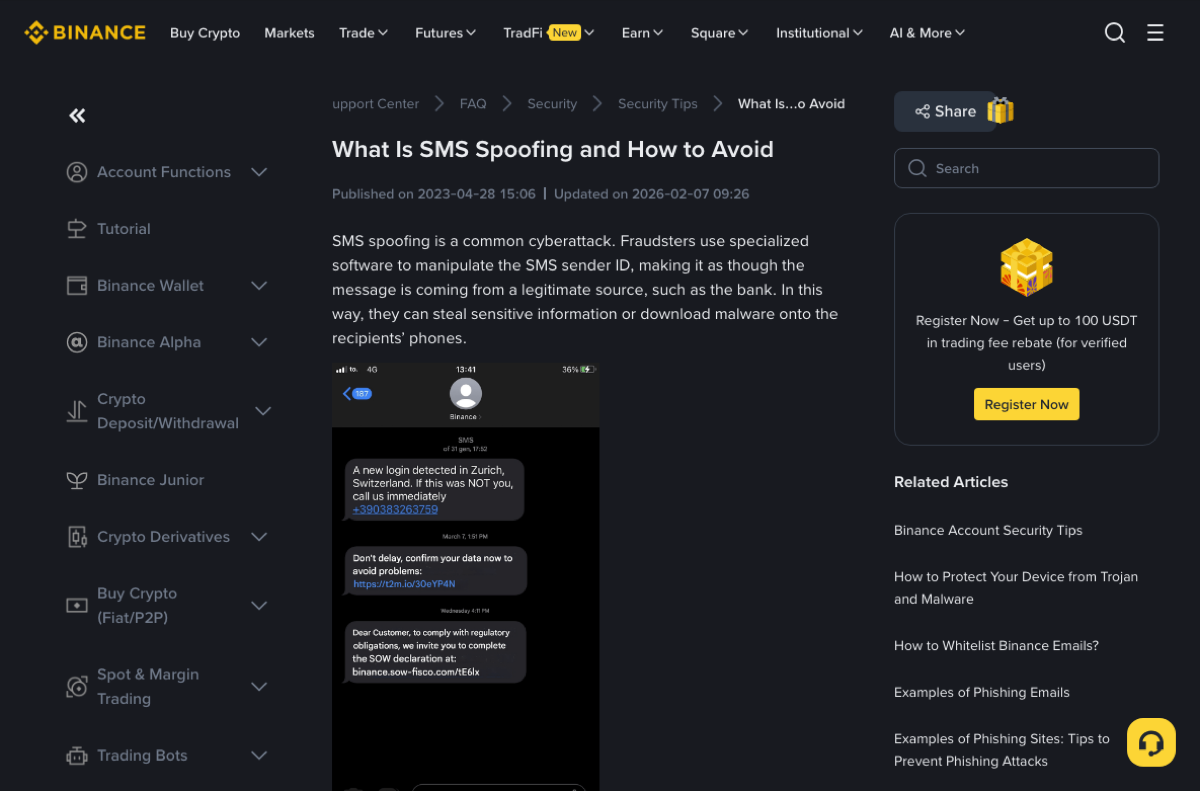
- A spoofed message. Binance's SMS spoofing guide explains that scammers can fake the sender ID, so a phishing text can sit in the same thread as genuine 2FA code messages. Every example it lists asks you to do something: follow a link to "upgrade" the account or cancel a withdrawal, or call a number about a new login.
Do you actually have an account with this exchange?
That answer decides what you do next. When you go to check, type the address into your browser yourself or open the official app already on your phone. Don't get there by tapping through the message. How to find the official Binance website and app covers how to recognise the real ones.
You've never signed up there
If the message is for registration or creating an account, you can ignore it. Without the code, nobody can finish verifying your email or number. There's no need to reply "this wasn't me", and no need to rush into opening an account just to claim the address first.
To find out whether your email or number has already been used, enter it once on the official sign-up page. If it says the contact is already registered, follow email or phone number already registered: go through account recovery and official support rather than opening a second account to work around it.
A burst of codes in a short time, from several different services, looks more like your number was submitted in bulk. Your phone's spam filtering and your carrier can do more about that than any single exchange, which has no control over texts sent by other platforms.
You already have an account
Read what the message says the code is for. Logging in, changing a password, linking an API key and confirming a withdrawal are different actions. Then sign in through the official app or website and look at recent activity. Binance's help page gives these paths:
- App: [Profile] - [Account Info] - [Security] - [Account Activities]
- Website: [Profile] - [Account] - [Security] - [Devices and Activities]
An unfamiliar device, location or time is your cue to change the password and remove the device, following Binance's account security help. If every entry is yours, the only open question is whether the message itself was genuine. The same Binance page notes that receiving a fake SMS or call does not necessarily mean your Binance account has been hacked.
How to check whether a message really came from Binance
The English version of Binance's SMS spoofing guide shows an update date of 2026-02-07; this section follows the copy we opened on 2026-11-19. The checks it describes differ depending on whether you hold an account.
- Binance Verify works with or without an account. Open binance.com/en/official-verification, choose the type from the drop-down on the left (Website, Email, Phone Number, Telegram and X (Twitter) are among the options), paste in the link, sender address or caller's number, and click Search. The page itself says Binance Verify only assists identity verification. A match tells you the source is official; it doesn't make whatever that source is asking for reasonable. A screenshot of the tool is in the official website and app guide.
- The Anti-Phishing Code needs an existing account. Once set, it's a phrase only you know, and official Binance emails include it. The help page says the feature now covers SMS too. In the app it's under [Profile] - [Account Info] - [Security] - [Anti-Phishing Code]; on the website, [Profile] - [Account] - [Security] - [Advanced Security]. After that, treat any text claiming to be Binance that lacks your phrase as suspect.
The same page also mentions uploading a text to the support chatbot to check it. If you try that, reach the chatbot from a Binance help center you opened yourself.
A caller or DM asks you for the code
A verification code is something you type into a page, not something you read out to a person. The FTC alert is blunt about it: anyone who asks for your account verification code is a scammer, so hang up, block them and stop replying. That holds whether they say they're exchange support, want to "cancel the code sent by mistake", or offer to stop a suspicious withdrawal for you.
Before typing any code anywhere, check what the message says it's for. One case in Binance's guide: a user got a fake "cancel your withdrawal" text, signed in on a phishing site, and was then steered into entering a 2FA code. That code was actually there to confirm the withdrawal. When the purpose written in the message doesn't match the story you're being told, stop.
You already gave the code away: what now
- Open the official app yourself, or type the website address by hand, and see whether you can still sign in.
- If you can, review the account activity described above, change your password and remove any device you don't recognise.
- If you're locked out, or you see actions you didn't take, contact support through the verified Binance help center. Give the time the message arrived, what it said and how the other person contacted you. Ignore any "support agent" who shows up in your DMs unprompted.
- If it was a sign-up code and you never had an account, someone may have registered with your email or number. Enter it on the official sign-up page to see whether it's already registered, then contact Binance as described in the already-registered guide.
In the US, the FTC alert points to ReportFraud.ftc.gov for reports. Elsewhere, use your local fraud reporting service or the police.