Getting started
How to Find the Official Binance Sign-Up Page and App
Don't enter any account details until you've checked the address and the app's source. Here's how to check the site, the store listing and installation problems.
To find the official app, type binance.com in your browser, open its download page and follow the option for your device to the app store. Check the app name and developer before installing. This guide covers Binance.com. The download entry, store example and authenticator purpose were checked on 20 September 2026.
Which problem are you seeing?
- Not sure the website in front of you is really Binance: confirm the website is Binance's
- Want the app but don't know which one, or can't find it in your store: choose the official download entry
- It won't download, install or open: download or installation problems
- The app is installed but you only see a login option: can't find sign-up in the app
Confirm the website is Binance's
Type the address yourself
Binance's website is binance.com. You can type it into the address bar yourself or use a bookmark you have checked. Read the actual address again after the page opens.
Be wary of search ads at the top of results, links posted in chats and social media, and links in texts or emails from someone claiming to be Binance support. They can lead to a look-alike site one or two letters off, or one that puts "binance" in front of or inside a different domain.
When we opened the website's sign-up page on 14 September 2026, it was on accounts.binance.com, a subdomain of binance.com. What counts is whether the main domain in the address bar is binance.com, not the page title, the logo, or "binance" appearing somewhere in the address.
Read the address beyond the familiar word
Expand the address bar and read the website name before the page path. For example, accounts.binance.com belongs to binance.com; binance.com.example does not. The second address is a fictional illustration, not a place to visit.
If the bar is shortened or showing search words, reveal the complete address first. A changed letter, or binance.com appearing only in the page path, is not the same website. With a QR code, inspect the destination it proposes opening; the surrounding poster or chat profile picture does not establish where the code leads.
Not sure? Use Binance Verify
Binance Verify lets you check whether a website, email address, phone number or Telegram account is officially Binance's. You don't need to sign in or have an account. Binance explains it in What Is Binance Verify?, and there's a link in the Support section of the website footer.
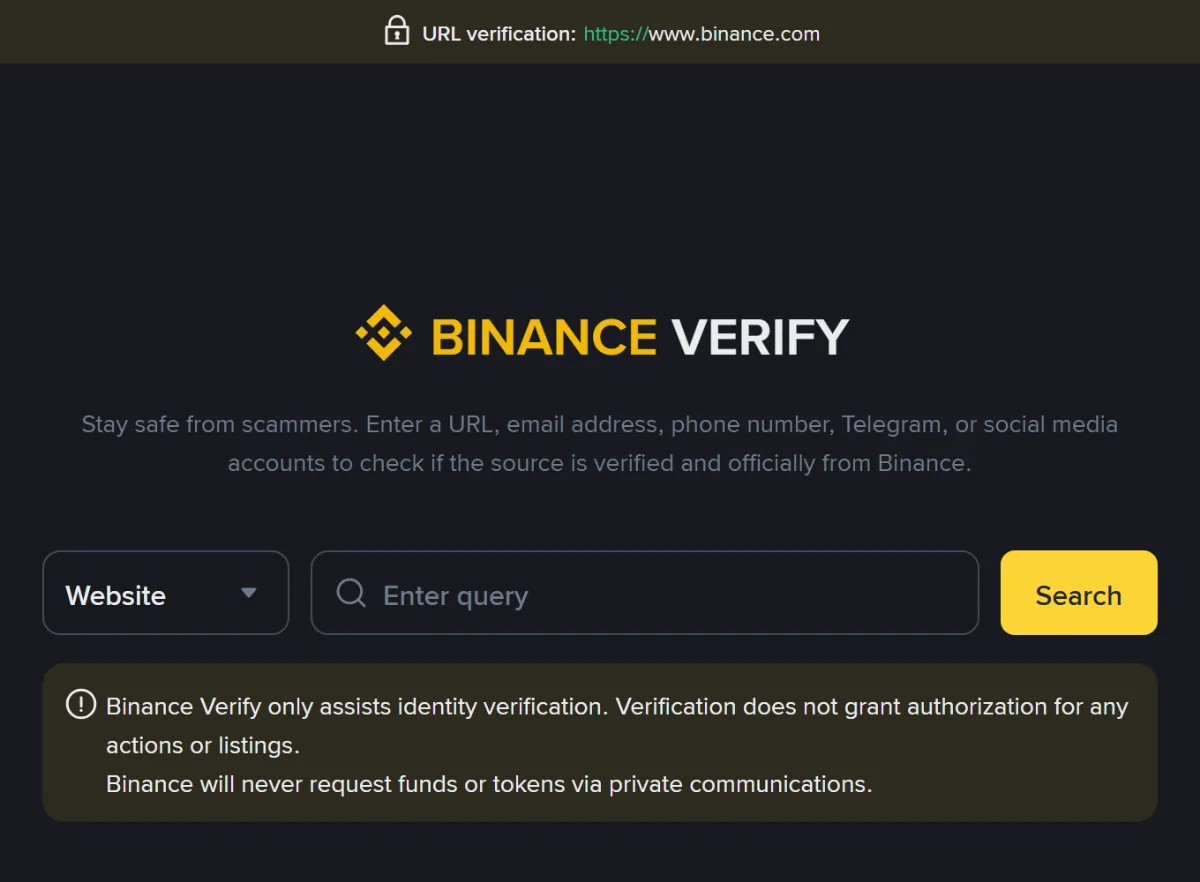
Check the actual address you opened or the exact source entered in Verify. A verified result is not approval of every message, attachment or later destination associated with it.
Reach Verify from the confirmed website's footer, select the relevant source type and enter the complete source. If it is unverified, pause and check for a typing error or an incomplete address. If it remains unclear, ask through the confirmed official help entry; do not rely on a replacement checking tool sent by the person you are investigating.
If your browser warns of a dangerous or phishing site, close the page. Don't click through. Type the official address in yourself and start again.
A location prompt appears
A notice saying the service is unavailable, or directing you elsewhere, can also be copied onto a fake page. It does not prove the website is genuine. Verify the address independently; if the notice is official, read the applicable conditions. Do not look for a mirror site or enter a false residence to get past it.
Choose the download and check the store listing
Type binance.com/en/download into the address bar and check the actual address when it opens. In the Binance App section, choose the iOS or Android option for your phone. If it opens a store, check the specific listing below. If it provides an Android installation file (APK), establish that you obtained it directly from the confirmed website; a file with the same name in a chat or shared folder is not the same source.
The same download page also offers desktop software and an authenticator. For phone registration, choose the Binance App. The official BAuthenticator instructions describe signing in to an existing Binance account and linking the authenticator to generate security codes. If the software you opened only asks you to scan a QR code or add a code-generating account, check which app you installed before returning to Binance’s sign-up entry.
| Where to look | What to compare |
|---|---|
| Store and listing | Confirm that you are on an app detail page in the phone's official store, not a store screenshot, search advertisement or request to install a separate downloader. |
| Name and developer | Compare these with the entry reached from the confirmed website, rather than relying on the yellow icon. The image below is a Bosnia and Herzegovina App Store example, not a universal store record. |
| Compatibility and availability | Read the current listing for this device. Our 20 September 2026 recheck of the Bosnia and Herzegovina App Store still showed iOS 15.0 or later; other devices and regions need their own check. |
Two details to compare on the store page
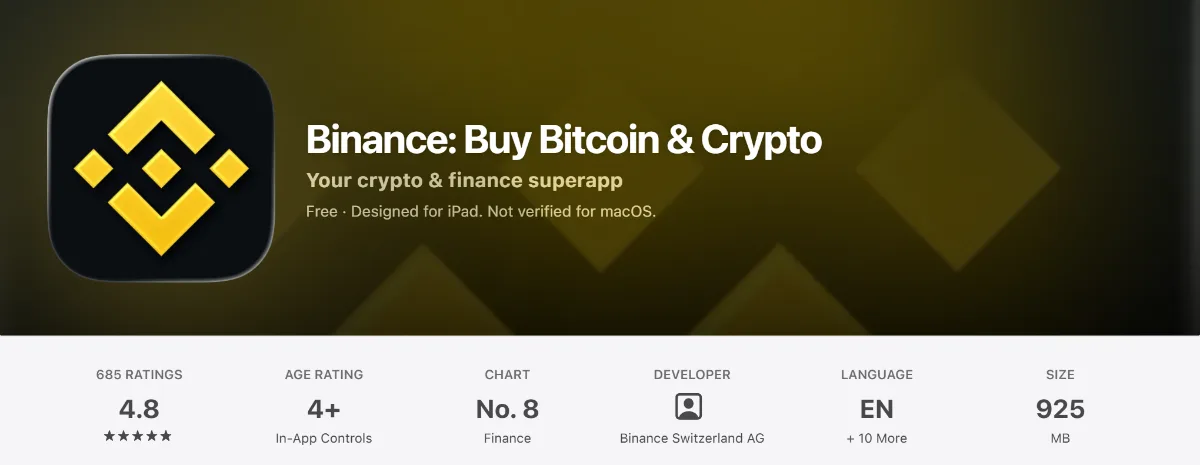
App nameBinance: Buy Bitcoin & Crypto
DeveloperBinance Switzerland AG
If the app name or developer does not match the listing reached from the confirmed website, return to the download page and open the relevant entry again. If the difference is still unexplained, ask official support before installing. The yellow icon, rankings and reviews do not replace that source check. The store age rating in the screenshot is not the age condition for opening a Binance personal account.
The app isn't in your store
A missing search result does not establish that the app is unlisted in your region. Use the store entry offered by the confirmed website to inspect the specific listing. Read whether it reports regional availability, device compatibility or a separate store-account issue.
Address the condition that is actually shown. If no reason is given, ask the store or developer for clarification. Do not enter a false region or accept a group-chat file, file-sharing link or claimed special version as a solution.
If you are eligible and the official website offers browser registration, that may be an available way to continue. Whether verification works on your device, or offers a QR handoff to a phone, depends on the current flow. The website does not remove regional restrictions. If you already created an account, sign in to that same account instead of starting another one.
Download or installation problems
Keep the exact store message before changing anything. Check whether the failure happens before a download starts, during the download, during installation, or after opening the app. A registration retry cannot repair a store download that never finished.
Get or Install does nothing
Look for a store-account confirmation, an existing download queue, or an error behind the app page. Complete a legitimate store prompt inside the store itself; do not enter your Apple or Google password into a page sent by someone offering installation help. Check the connection and the phone's free storage before trying the download again.
On iPhone, a billing or verification message can concern the Apple account rather than a Binance registration fee. Apple's download troubleshooting guide explains that a valid payment method may be needed even for a free app. It also covers prioritising a queued download and restarting the device. Read the exact message before deciding which step applies.
A progress indicator means the download has started; it does not mean the app is installed or that a Binance account has been created. Let the current download finish before opening another copy of the listing and pressing Install repeatedly.
The download stops partway through
Check whether the store says it is waiting for a network, has insufficient space, or has encountered another error. If the connection is the issue, try a stable network you are allowed to use. If space is the issue, review what you can safely remove in the phone's storage settings. Do not delete account recovery information or document originals to make room.
Google's basic Play Store checks cover connection, storage, system updates, reopening the store, restarting and date/time settings. Choose a check relevant to the message, then see whether the download resumes or a different error appears. There is no need to perform every setting change when the store has already identified insufficient space.
Note whether this happens only with Binance or also with other downloads you already intended to make. You do not need to install an unrelated app as a test. A wider download problem is useful information for store support; a failure affecting one listing is useful information when checking that listing's availability and compatibility.
The listing says unavailable or incompatible
Open the listing's device requirements and compare them with the phone model and operating-system version in Settings. Google explains in its single-app download help that the app page shows whether it is available for the device. A missing Install button does not tell you which requirement failed unless the page says so.
If an ordinary supported system update meets the stated requirement, read the phone's update instructions before proceeding. An update cannot make every unsupported model compatible or remove a regional restriction. If the reason remains unclear, ask the store or developer about the exact message instead of installing an older package from a file-sharing site.
The app installed but closes or stays blank
Record whether it closes before a home screen appears, after tapping Sign up, or after returning from another app. Check for an update on the same confirmed store listing. Close and reopen the app, or restart the phone after preserving any unfinished work in other apps. Then check whether you can reach the same step again.
Do not make clearing app storage or reinstalling the first response, especially if registration has already started. You may lose local session information and need to sign in again. First confirm which account and sign-in method you used and whether the process recorded any progress. If a later reinstall is recommended by official support, establish how you will regain access before proceeding.
If the relevant checks make no difference, use the official support route and describe the phone model, OS and app versions, store, exact error, stage and checks already made. Say if you cannot reach the app at all. Never include a password or verification code in that description. A browser may offer another way to access the same eligible account, but confirm the existing account status before starting registration again.
Can't find sign-up in the app
Binance's app registration instructions, updated on 24 November 2025, show Sign up followed by Create a Binance Account. Read the current button labels; a combined login and registration entry may ask you to choose which action you want.
If the screen differs from the guide, identify what it is asking before entering information:
- A home screen: check whether it is a visitor view or shows a signed-in account. If an account is shown, check its identity privately. Do not assume it is yours because it appears on your phone. On a borrowed device, let the owner manage their session or use your own device.
- A password field: read whether it says to create a password, enter an existing one, or sign in to Google or Apple. The field alone does not establish that the contact is already registered. Do not paste a provider password into a Binance password-creation field.
- A security or code prompt: check what action is being confirmed and which account or destination is shown. Such a prompt can occur within a flow; it is not proof that all registration steps are complete.
- Identity verification: check the current account and status before supplying documents. If the intended account already exists, continue its verification process instead of creating another account.
When the page explicitly says a contact is already registered, use the existing-account checks. If you previously continued with a provider, use that same route where supported and check the provider account selected. A different method does not automatically merge accounts.
Once you find the creation route, continue with the app section of the sign-up guide. If you need to stop, remember the method and last completed step, without copying passwords or codes into notes. Finding Sign up is only the start; use the account status to establish what was completed.
Questions about official sources
How can I confirm that an app is the official Binance app?
Reach the offered store listing from the confirmed Binance website and check the actual page, app name and developer. If you entered a password or code into an unknown app, stop using it and seek account-security help through the official service on a trusted device. Deleting the app alone cannot recall information already exposed.
Where can I choose between web and app registration?
Choose an account-creation entry offered on the current official website or app. Accessing one account on both requires signing in to that same existing account; registering separately does not merge accounts. Use a device you can operate, with camera, QR and availability options determined by the actual flow.