Getting started
Where to Enter a Binance Referral Code, and What If You Missed It
Find the referral step, check a blank or rejected field, and understand what is possible after registration. Entered text, a linked code and a reward are different results.
Find the part that matches your screen
- No referral field yet: Binance’s website guide places it at the account-created stage. See where the field appears before restarting.
- You opened an invitation: check the code and its binding status. A referral parameter in the address alone does not confirm the result.
- The field is blank or the code is invalid: use the checks under blank and invalid fields.
- You have already finished: the rules for adding a code later depend on the referral mode and account. An existing relationship cannot simply be replaced.
- You want to know the benefit: check the offer and its conditions. A rate shown to the referrer is not your reward.
This guide concerns a personal Binance exchange account. We rechecked the website registration instructions and the Pro and Lite FAQs cited below on 20 September 2026. A campaign invitation, a wallet referral and a verification code are not interchangeable, even when each is described casually as a “code.”
Where does the referral field appear?
In Binance’s website registration instructions, the referral field is shown after account creation. The email and phone example reaches that screen after the contact code and password steps. Other sign-up methods have their own sequence; do not look for a password step merely because the email example includes one.
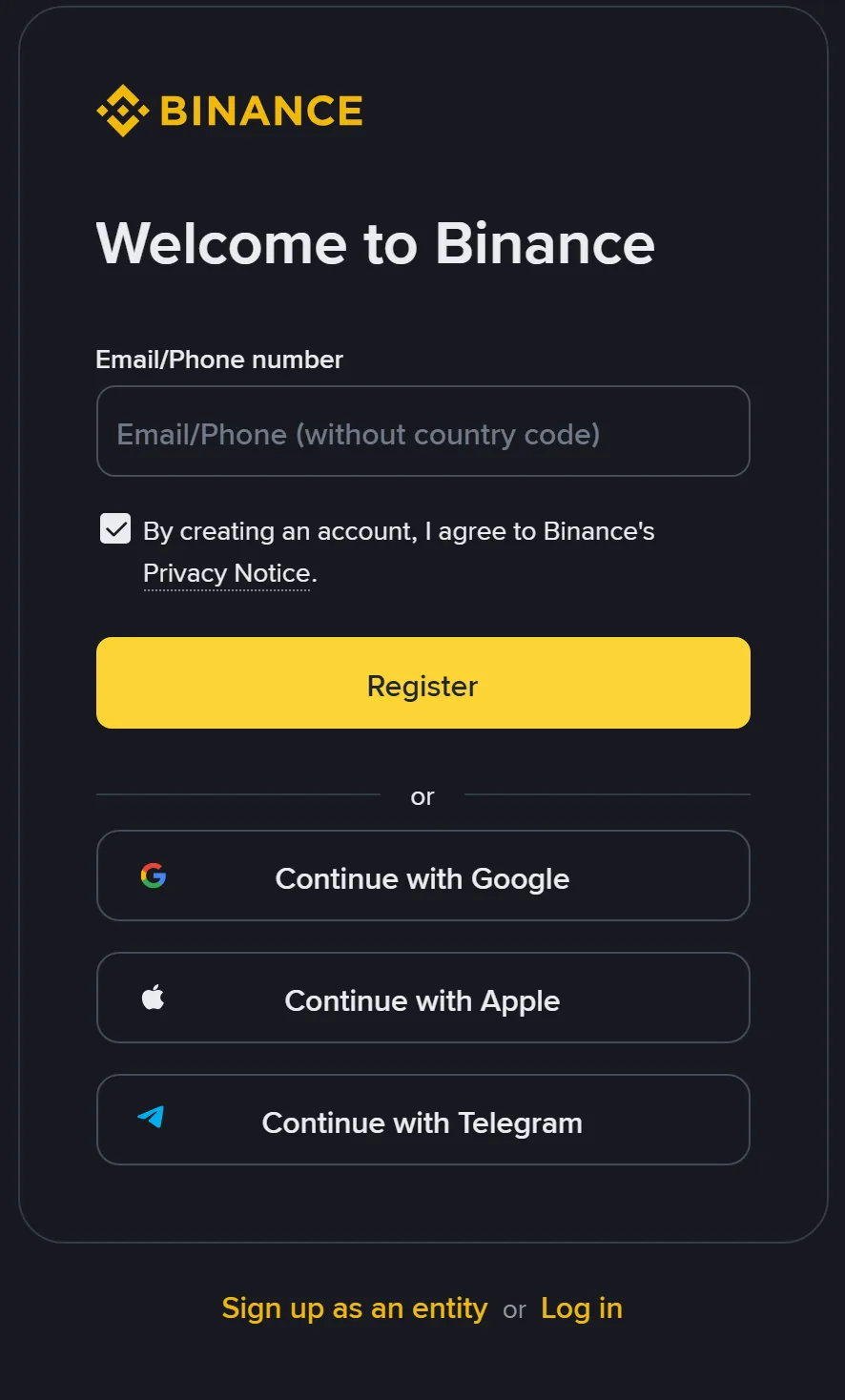
Contact details first; check the referral later
Email or phone numberThe field in this screenshot asks for the contact details you will use to register.
Verification codeThe code you subsequently receive by email or text goes in the corresponding verification field.
Referral codeThe website guide places this step after account creation. Check the intended code and Linked status there.
English desktop opening screen, captured 14 September 2026. It contains no referral field and does not show the later binding result.
Read the heading on your current screen first. If it asks for contact details, complete that step; if the account has been created, look for the referral code and its status. The app, third-party sign-in and later screens may use a different sequence. Follow the page you have reached instead of restarting to reproduce this opening screenshot.
When an email or text arrives, check that the current field asks for a verification code before entering the code from that message. Enter an invitation only in a field labelled Referral code or its equivalent. Our code, BN6861, identifies a referral; the code sent to your inbox or phone checks that you can access it. Keep the two in their respective fields.
If the page offers a collapsed referral section, read and open that section before continuing. If it does not offer one, do not invent a place to enter the code or create another account to reproduce the screenshot. Record your sign-up method and the screen heading if you need help finding the appropriate step.
If you have reached login or identity verification, think back to the referral step. If you saw the intended code and Linked, continue with the current screen. If you did not see that result or cannot remember it, keep the sign-up method and screen heading and use the checks below. Logging in or starting identity verification does not itself show the referral result.
Check an invitation before and after opening it
Before entering account details, inspect the address you opened. The registration address used by this site is on accounts.binance.com. A name that merely contains “binance” somewhere in a different domain is not the same address. If the destination is unexpected, stop entering information and use the official website and app checks to verify it.
There is no need to install a stranger’s “special registration app,” send them a payment, or hand over your password to enter an invitation code. A genuine-looking logo or a screenshot supplied by a promoter is not a check of the destination you have actually opened.
At the referral step, check two things: the code is the one you intended to use, and its status says Linked. Binance’s example shows both. If there is only text in an editable field, look for the confirmation action offered there; if the intended code is linked, continue. A code in the URL identifies the invitation you opened. Use the account’s result to check what was actually accepted.
If you opened the link on a computer but continued on a phone, check the result where you completed the process. Do not assume switching devices either preserved or removed the invitation. The same applies if a messaging app opened the page first and you later used another browser.
When the expected code is shown as linked, you do not need to submit it again every time you log in on another device. If the status is unclear, keep the screen wording and ask through official account help. This site can explain what to look for, but it cannot inspect your account’s referral relationship.
Also read whose invitation a code belongs to. A section asking you to invite friends may display a code for you to share, rather than the one used when you joined. Check the heading and the action beside it. A button for copying your own invitation does not answer “who referred me?” If that is the only code you can find, describe that section when asking for help instead of reporting that your original code has changed.
The field is blank, invalid or shows the wrong code
A blank field you can edit
If the field is editable and you want to use an invitation, enter the intended code and follow the confirmation action on that page. For this site, enter BN6861 exactly as shown. Then look for the binding result. If the box remains empty or an error appears, keep the message and follow the relevant checks below; do not close the page merely because you have typed the code.
Check the text after pasting. Copying a whole sentence from a message can bring punctuation, spaces or explanatory words into the field. Do not paste the full registration URL into a box asking only for a code. If you cannot select just the code, type it carefully and compare it before submitting.
A code the page rejects
First correct any visible typing or copying mistake. Then check what the message actually says: an invalid value, an unavailable offer and an account that is not eligible are different problems. Save the wording rather than translating all of them into “the code does not work.”
Ask the person who supplied the code which Binance product and referral offer it belongs to. A code intended for another product or campaign cannot be judged using the exchange registration example. Avoid trying a long list of unrelated codes; that will not tell you why the original one was rejected.
Binance’s website instructions allow editing or replacing an invalid code before it is linked. If the page offers registration without an optional referral, you can choose that route. Read the later-binding conditions first if retaining a referral matters to you: continuing without one is not a promise that you can add it afterwards.
A different code is already shown
Distinguish an editable value from an established relationship. If it is still editable and unlinked, use the controls the page provides to correct it. If it says linked, do not assume opening another invitation will overwrite it. The official rules on an existing relationship are explained below.
If you believe the displayed result is an error, describe the intended code, the code or status shown, and the sign-up method to official support. Keep passwords and verification codes out of that explanation. Do not send a promoter control of the account so they can supposedly fix the field.
Can you add a referral code after registration?
Sometimes there is a specific official route, but it is not a general right to add any code to any account. Check the offer’s mode first. The Referral Pro FAQ, updated 5 August 2026, links to a binding process for users who forgot a Pro invitation.
The published conditions require all of the following:
- No use of the same identity verification (KYC) information on another account in the preceding 180 days.
- No existing referral relationship.
- A parent account: the main account, rather than a sub-account.
- Registration within 30 days.
- No deposit or trading activity.
- No wash-trader flag.
That FAQ also says an established relationship cannot be changed or removed.
Check the registration date, account type and activity history you can access, then use the official process to check eligibility. An account can already have a referral through a link even if you never typed a code, and Binance must check its internal account flags. The process also needs to confirm that the particular code is supported; completing your own checklist does not establish a successful binding.
Read the FAQ and follow its binding entry from there if it fits your situation. A registration link and a later-binding entry are different routes; repeatedly reopening registration after signing in will not establish eligibility. Review the code and any confirmation before completing an available binding action.
If the official route rejects the request, keep its reason.
Ask about that reason rather than stating that meeting the age-of-account condition guarantees acceptance. The 30-day condition is only one part of the list, and an empty balance is not the same thing as having no previous deposit or trading activity.
For Referral Lite, the FAQ updated 22 January 2026 says a failed relationship caused by forgetting the invitation at registration cannot be corrected afterwards. Do not apply the Pro exception to a Lite invitation or an unidentified promotion. Ask which mode applies if the original invitation does not make it clear.
Closing an account and opening another to switch referral benefits is also addressed in the Pro FAQ: Binance may remove referral benefits for the new account when it detects this. Treat an existing-account issue through official help instead of deleting the account as a code-replacement method.
What does the code actually give you?
Check the code binding separately from your own benefit. Under the Pro explanation, a referred user’s rebate depends on the referrer’s sharing settings. A percentage displayed to the referrer is not necessarily your discount.
Before relying on a claimed benefit, find its description on the Binance page available to you. Read who qualifies, what must be completed, when it expires and what form the benefit takes. A voucher face value, a maximum promotional amount and cash available to withdraw do not describe the same benefit.
If a code appears linked but a promised reward does not appear, keep those observations separate.
Ask about the named offer, the missing item and any task or date shown. Do not assume the referral failed solely because there is no immediately visible reward, or move money to “test” whether a promotion will activate.
Our code is BN6861. The linked offer is Binance’s Affiliate-Boosted Welcome Bonus. The registration guide explains that campaign and its conditions. Eligibility and tasks depend on the offer shown to your account; entering a code after registration may not allocate that offer.
If a referral field is available during registration and you choose this invitation, enter BN6861 there and verify the binding result. If you have already registered, use the mode-specific checks above rather than assuming this code is eligible for every later-binding process. Our referral disclosure explains this website’s relationship to invitations.
Manual entry and checking your benefit
Do I need to type the code after opening an invitation link?
Check the referral step. If the intended code is already shown as linked, do not enter it again. If an editable field is blank, you may enter it there and check the result. The link’s address alone does not confirm binding.
Is a rate shown to the referrer my discount?
No. Check the benefit offered to your account, including any sharing settings, tasks and expiry. A rate shown to a referrer does not establish the rebate or reward you receive.