Identity verification
Binance Verification: Country of Residence, Issuing Country and Name
Country of residence means where you live now, and it can differ from the country that issued your ID. Mistakes are corrected according to the stage you're at.
Country of residence concerns where you actually live; issuing country concerns the document you selected. They can differ. Read each name, date and address field separately. Entered something wrong? Find the correction steps
This guide uses Binance's personal verification instructions and the identity and address update guides below. We rechecked their field and correction instructions on 20 September 2026. Follow the choices, sequence and field requirements on your current screen.
Residence, issuing country and nationality
| Field | What to check |
|---|---|
| Country of residence | Where you actually live. Do not copy the passport country into this field just because that document is in your hand. |
| Document issuing country or region | The issuing country or region of the particular document selected for verification. Check the document, not the country where you happen to be applying. |
| Document type | Match the actual file: passport, identity card or another option the current flow accepts. A different document may require a different selection. |
| Nationality, if requested | Read the citizenship information the field asks for. Do not infer it from a phone number, address or network location. |
| Phone country code | The calling-code choice for the number you are entering. It does not decide your residence or nationality. |
One person, two different country answers
Example: lives in Singapore
Country of residenceSingapore
Uses a Malaysian passport
Document issuing countryMalaysia
When a country is already selected, first read whether the field asks for residence, issuing country or something else. Compare it with your own circumstances. Correct an editable answer if necessary; if it is locked, use the correction steps below. A selection suggested from your network location still needs this check before you accept it.
Choosing your country of residence
Use your actual residence. A holiday destination, temporary connection or phone number from another country is not enough to choose that country as where you live.
- You live in the country that issued your document: the two selections may be the same. Still check each label and the document you chose.
- You live abroad: answer residence separately from the issuing country. If the current process asks for address evidence, check the acceptable material for your circumstances.
- You are travelling: distinguish your usual home from the place you are visiting. A short trip is not, by itself, a reason to update residence.
If you recently moved or divide your time between countries and cannot tell which condition the page applies, explain the situation to official support before submitting. Do not choose whichever country leaves more options visible. A tutorial cannot determine the applicable residence requirement from travel dates alone.
The correct country or document option is missing
Read the selector’s heading, clear any search text inside it, and look again for the country or region name. If you opened the phone calling-code or document-type list, return to the field you need to complete. These lists contain different options; a country appearing beside a phone number does not tell you whether its documents are accepted.
If the correct choice still does not appear, keep the field name and the notice shown. Ask whether the relevant service or document is supported for your circumstances. Do not select a neighbouring country, another nationality or a different document type just to advance the form.
If you move later, use the applicable correction or update route. The official address-update article explains that a move between countries may involve verification again and changes to available services. Read the current account notice rather than assuming an address edit is purely cosmetic.
Your name and date of birth
Read the name fields before copying
Use the selected valid document as your reference, together with the instructions beside the field. A single Full name field and separate Surname and Given names fields need different placement, even when the underlying name is the same.
- Separate surname and given names: use the labels on the document to identify the parts. Do not move a name between fields merely to recreate the order in which you usually write it.
- Middle or multiple given names: check whether the form provides a separate field or groups them with given names. Do not omit part of the name just because it makes the form shorter.
- More than one script: use the script or transliteration the current field requests and the corresponding form on the selected document. Do not invent a new English spelling to fit a screenshot.
- Nickname or previous name: do not substitute it for the current identity information the process requests. If your name has changed, establish which valid document and correction route apply.
The field rejects part of your name
Check for a copied leading or trailing space and any visible format instruction. If the problem is a required surname that your document does not contain, a length limit, an accent or another character, keep the exact warning and field label. Ask how that form handles your case instead of duplicating your single name, removing part of it or entering a made-up placeholder.
If information was read automatically from the document, inspect it before confirmation. Compare the selected image with the populated fields so that an old file or incorrectly recognised character is not carried forward. If the value is already locked, use the stage checks below.
Date of birth and document number
Read the date format or calendar labels before entering the date. A numeric date can be interpreted in more than one order. If the form offers a calendar, check the selected day, month and year after choosing them. Confirm that the field asks for birth date rather than issue or expiry date.
Compare the document number with the number on the particular document you selected. Include required letters and check similar-looking characters. If you replaced an old document, an old saved number may no longer match the new one. Do not paste the number into a third-party checking service.
Before confirming, compare each field with what it actually asks for: identity details with the selected document, residence with your actual home, and contact information with the contact you control.
Writing your residential address
If the process asks for a full address, use the actual residential address and the required fields shown. Include the unit or house, street, locality and postal information where applicable. If your address lacks a required element, ask how it should be entered rather than inventing one.
When proof is requested, compare the entered address with the evidence you plan to provide. An old bill may still show a previous home. Different abbreviations or address order need to be understood in context; do not alter the document to copy the form's layout. The address-proof guide covers accepted evidence and mismatches.
Living with parents, relatives or a landlord does not make the address automatically wrong. The separate question is which document proves that you live there. If you do not have a bill in your name, check the applicable alternatives; someone else's bill is not automatically acceptable. A workplace used only for correspondence is not your residential address.
Made a mistake? It depends on the stage
| Current stage | Entry and requirements to check |
|---|---|
| Before confirming personal details | Use an available back or edit option in this flow, then inspect the confirmation screen. If none is available, ask for help before confirming known errors. |
| Confirmed and under review | Fields may be locked. Keep the incorrect field and check an applicable correction tool or ask support; do not try to overwrite the issue with another application. |
| A rejection identifies wrong details | Read whether the notice asks for correction, replacement or resubmission. Ask when the route is unclear; not every rejection calls for an identity reset. |
| Verified information later changes | Read the relevant update process, eligibility and declaration before confirming the change. |
Self-service options in the Help Center
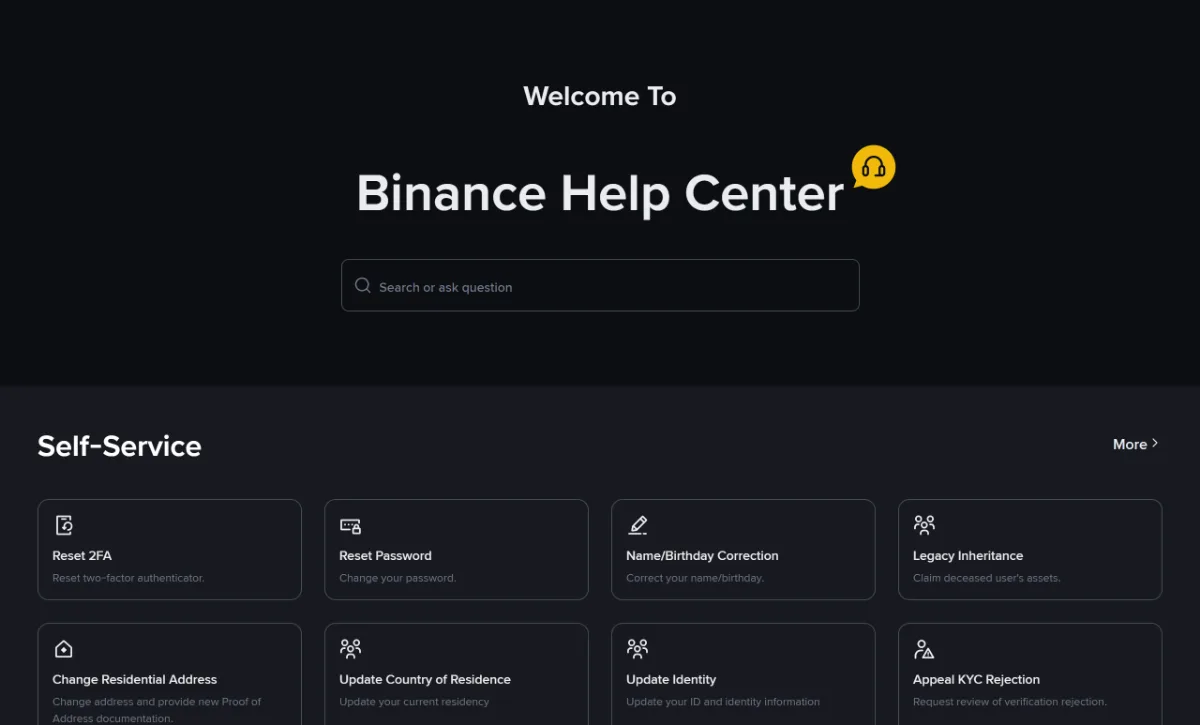
The Help Center lists Name/Birthday Correction, Change Residential Address, Update Country of Residence and Update Identity. Match the tool to the field you need changed, then read whether it applies to your account. A tool being listed does not mean every application stage permits the edit. Sign in to your own account when prompted, and ask official support if you cannot proceed.
Updating after you're verified
Binance's verified identity update instructions, updated 13 March 2026, describe the update entry and distinguish some regional flows. Choose a reason that is true. If none applies or you cannot continue, ask official support instead of selecting a false reason to open the form.
That article says declaring a KYC update restricts the account to Withdrawal Only until the new information is submitted and verified. Read the current declaration before confirming. This is not a universal fix for a typing error, and should not be started merely to see what it does.
Moving house or country
Binance's residential address update guide, labelled last updated 27 November 2024 and rechecked on 20 September 2026, describes Edit Address and supplying address evidence. Moving countries may involve verification again. Its 1–2 working days refers to the address-update review described there, not a universal deadline for all corrections.
Check what happened after editing
After saving, look for a submission confirmation or a new application record, then check the changed details and review status. If the old information remains, confirm that you are viewing the right account and page and whether this update is still being reviewed. When a submission is already recorded, follow its status instead of sending another just to refresh the display.
For example, if the problem is a date of birth but the tool only lets you replace a document, pause before confirming and ask whether you chose the right entry. If different notices arrive, keep their times and references and use the status and notice checks to identify the operation each concerns.
If a field has no edit route, will not save, or reverts afterwards, tell official support the field label, current stage, exact warning and actions already tried. Describe the problem first; do not post a name, birth date or document number publicly.
Final check: if the correction requires review, follow its result notice. For an edit without a review step, check that the saved details have changed. Ask support if the result is unclear; submitted does not mean approved.
When details don't match your documents
- Your details are right, but the document is the problem (unsupported type, expired, unreadable photo): see ID document upload failed or rejected.
- The name or address on your proof of address doesn't match: the name must match your ID and the address must match what you entered. See proof of address rejected.
- You've corrected details and are waiting: see still under review, and follow the current waiting instructions; respond separately to any new material request.
Correct an input error through the applicable route. If a document or bill is outdated, establish how to obtain and supply current accepted material. Do not change its contents to manufacture a match or present old information as current.
Different countries and details you cannot edit
Are country of residence and document issuing country the same?
They ask different questions. Residence concerns where you actually live; issuing country concerns the selected document. The answers can match or differ. Check each field against the relevant facts instead of changing one for visual consistency.
What should I do when a field is no longer editable?
Check the current stage and the field concerned. Read an applicable correction tool if available, or ask official support if none applies or it will not let you continue. Updating an already verified identity has its own conditions and declaration; it is not a universal remedy for first-time input errors. Do not open another account to correct details.